
Post
Understanding GPU VRAM: How Much Do You Actually Need in 2025?
Jun
Understanding GPU VRAM: How Much Do You Actually Need in 2025?
When shopping for a graphics card in 2025, you’ll inevitably encounter one specification that sparks endless debate among gamers, content creators, and PC enthusiasts: VRAM. Some users insist that 8GB is still enough, while others argue that anything below 16GB is already obsolete. With modern games becoming increasingly demanding and AI workloads exploding in popularity, understanding VRAM has never been more important.
The truth is that VRAM capacity can significantly impact your experience, but not always in the ways many people assume. More VRAM doesn’t automatically make a GPU faster, yet insufficient VRAM can cripple performance even on an otherwise powerful graphics card. Knowing how VRAM works, how modern applications use it, and how much you’ll realistically need can help you make a smarter purchasing decision and avoid costly mistakes.
This guide explains everything you need to know about GPU VRAM in 2025, including what it does, how much different resolutions require, how professional workloads affect memory usage, and what capacities make sense for various budgets and use cases.
What Is VRAM?
VRAM stands for Video Random Access Memory. It is the dedicated memory located directly on a graphics card and serves as the GPU’s working space. Much like system RAM helps your CPU access data quickly, VRAM allows the graphics processor to store and retrieve information required for rendering images, videos, and 3D environments.
Unlike system memory, VRAM is specifically optimized for graphics workloads and provides extremely high bandwidth. Modern GPUs use technologies such as:
- GDDR6
- GDDR6X
- GDDR7
- HBM (High Bandwidth Memory in professional solutions)
These memory technologies deliver hundreds of gigabytes or even terabytes of bandwidth per second, enabling the GPU to process large amounts of graphical data efficiently.
What Does VRAM Store?
During gaming or content creation, VRAM stores numerous types of data required for rendering and computation.
Examples include:
- Texture files
- Frame buffers
- Shadow maps
- Geometry data
- Shader programs
- Ray tracing acceleration structures
- Post-processing effects
- AI model weights and datasets
Every object you see in a game relies on data stored in VRAM. High-resolution textures, advanced lighting effects, and detailed environments all require substantial memory resources.
As games become more visually sophisticated, VRAM requirements naturally increase.
Why VRAM Matters
A graphics card’s performance depends on two primary factors:
- The GPU’s processing power.
- The amount and speed of available VRAM.
If the GPU lacks sufficient processing power, performance suffers because it cannot render frames quickly enough.
If the GPU lacks sufficient VRAM, performance suffers because it cannot store all required assets locally.
When VRAM becomes full, the graphics card must move data between VRAM and system RAM using the PCIe interface. Even PCIe 5.0 is dramatically slower than direct access to onboard memory, resulting in:
- Frame time spikes
- Micro-stuttering
- Texture pop-in
- Reduced average FPS
- Longer loading times
This is why a card with enough VRAM often feels smoother than a card that technically delivers similar average frame rates.
VRAM vs Memory Bandwidth
Capacity and bandwidth are often confused, but they serve different purposes.
VRAM capacity determines how much data can be stored at once.
Memory bandwidth determines how quickly the GPU can access that data.
For example:
- 16GB GDDR7 with 1 TB/s bandwidth
- 16GB GDDR6 with 600 GB/s bandwidth
Both cards have the same capacity, but the faster memory subsystem allows the GPU to move data more efficiently.
A balanced GPU requires both adequate capacity and sufficient bandwidth.
VRAM Requirements for 1080p Gaming
Full HD (1920×1080) remains the most popular gaming resolution worldwide. Fortunately, it is also the least demanding in terms of VRAM requirements.
In 2025, most modern games use:
- 6GB to 8GB at Medium settings
- 7GB to 10GB at High settings
- 8GB to 12GB at Ultra settings
For purely 1080p gaming:
- 8GB: Still acceptable.
- 10GB–12GB: Comfortable.
- 16GB: Excellent future-proofing.
Competitive games such as Counter-Strike 2, Valorant, League of Legends, Fortnite, and Rocket League generally require far less VRAM than modern AAA titles.
VRAM Requirements for 1440p Gaming
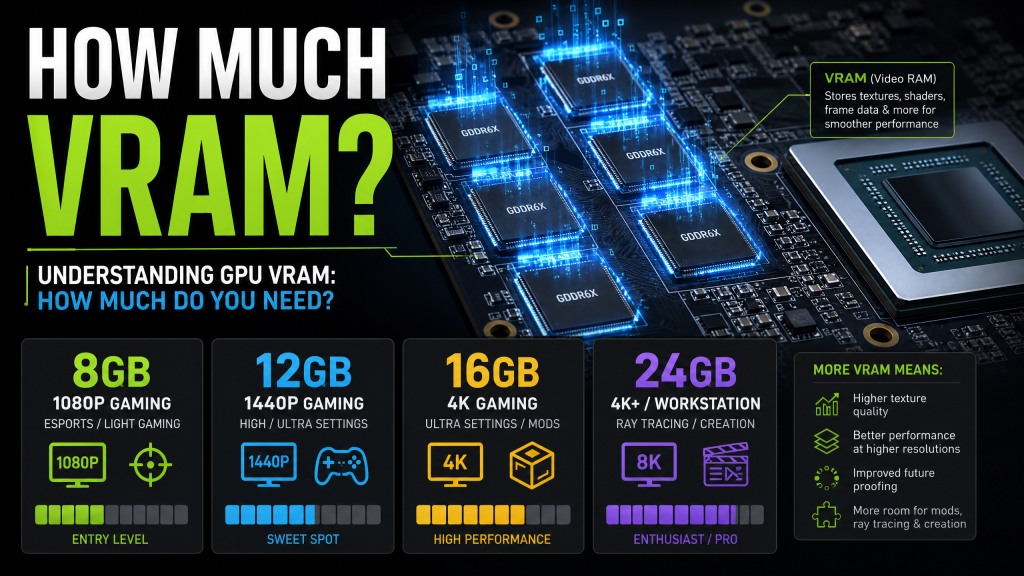
1440p (2560×1440) has become the sweet spot for PC gaming because it provides significantly sharper visuals while remaining easier to drive than 4K.
At this resolution, memory usage increases substantially.
Modern AAA games often consume:
- 8GB to 10GB on High settings
- 10GB to 14GB on Ultra settings
- 12GB+ with ray tracing enabled
Recommended capacities:
- 8GB: Becoming restrictive.
- 12GB: Minimum recommendation.
- 16GB: Ideal.
- 20GB+: Excellent future-proofing.
Many gamers planning to keep a graphics card for four or five years should strongly consider 16GB at this resolution.
VRAM Requirements for 4K Gaming
4K gaming places enormous demands on both GPU compute performance and memory capacity.
A single 4K frame contains four times as many pixels as 1080p, requiring larger frame buffers and significantly more texture data.
Modern games can consume:
- 12GB to 16GB at High settings
- 14GB to 18GB at Ultra settings
- 16GB to 20GB+ with ray tracing and texture packs
Recommended capacities:
- 12GB: Entry-level 4K.
- 16GB: Comfortable minimum.
- 20GB–24GB: Excellent.
- 32GB: Maximum future-proofing.
For serious 4K gaming, VRAM headroom is extremely valuable.
Ray Tracing and VRAM Usage
Ray tracing introduces additional memory requirements because the GPU must store acceleration structures that describe the scene geometry used for ray traversal.
Games with extensive ray tracing often consume significantly more VRAM than their rasterized counterparts.
Examples include:
- Cyberpunk 2077
- Alan Wake 2
- Black Myth: Wukong
- Portal RTX
- Control
Enabling ray tracing can increase VRAM usage by several gigabytes depending on the implementation.
VRAM for Content Creation
Professional applications often require even more VRAM than gaming.
Video Editing
For Adobe Premiere Pro, DaVinci Resolve, and Final Cut workflows:
- 8GB: Basic 1080p editing
- 12GB: Comfortable 4K editing
- 16GB+: Professional 4K workflows
- 24GB+: 8K production environments
3D Rendering
Applications such as Blender, Maya, Cinema 4D, and Unreal Engine store scene geometry and textures in VRAM.
Large projects can easily consume:
- 16GB
- 24GB
- 48GB+
Insufficient VRAM often forces rendering software to fall back to slower system memory.
VRAM for AI and Machine Learning
Artificial intelligence workloads have become one of the biggest drivers of VRAM demand.
Large language models, image generation systems, and neural network training require substantial memory resources.
Typical recommendations:
- 12GB: Entry-level AI experimentation
- 16GB: Serious hobbyist usage
- 24GB: Local LLMs and Stable Diffusion workflows
- 32GB+: Advanced AI development
- 48GB+: Professional workloads
For AI applications, VRAM capacity is often more important than raw GPU speed.
The Future of VRAM
History shows a consistent trend toward higher memory requirements.
| Year | Typical High-End VRAM |
|---|---|
| 2015 | 4GB |
| 2018 | 8GB |
| 2021 | 10GB-12GB |
| 2024 | 16GB-24GB |
| 2025 | 16GB-32GB |
As game assets grow larger and AI technologies become increasingly integrated into consumer applications, VRAM requirements will continue to rise.
Common VRAM Myths
More VRAM Always Means Better Performance
False.
A weak GPU with 16GB VRAM can still perform worse than a powerful GPU with 12GB if neither card exceeds its memory limits.
Running Out of VRAM Causes Crashes
Usually false.
Most modern systems simply move data to system RAM, resulting in severe performance degradation rather than immediate crashes.
8GB Is Completely Obsolete
Not entirely.
For 1080p gaming and esports titles, 8GB remains usable. However, it is becoming increasingly restrictive for demanding AAA releases.
Recommended VRAM Capacity by User Type
| User Type | Recommended VRAM |
|---|---|
| Esports Gamer | 8GB |
| 1080p AAA Gamer | 12GB |
| 1440p Gamer | 12GB-16GB |
| 4K Gamer | 16GB-24GB |
| Video Editor | 16GB+ |
| 3D Artist | 24GB+ |
| AI/ML Enthusiast | 24GB+ |
Final Verdict
VRAM is one of the most important considerations when purchasing a graphics card in 2025. While raw GPU performance remains the primary factor determining frame rates, sufficient VRAM ensures that performance remains consistent as game assets, resolutions, and rendering technologies continue to evolve.
For most gamers today, 12GB represents a practical minimum, while 16GB offers a comfortable balance of performance and longevity. Enthusiasts targeting 4K gaming, professional content creation, or AI workloads should strongly consider GPUs with 24GB or more.
The best approach is to buy slightly more VRAM than you currently need. A graphics card with extra memory capacity is far more likely to remain relevant and enjoyable for years to come, making it one of the smartest long-term investments you can make when building or upgrading a PC.
