Post
CPUs vs GPUs: Understanding the Key Differences and Choosing the Right Hardware for Your Needs
Jun
CPU vs GPU: Understanding the Key Differences and Choosing the Right Hardware for Your Needs
When building a computer, upgrading hardware, or selecting components for gaming, content creation, artificial intelligence, or professional workloads, one of the most common questions is: What is the difference between a CPU and a GPU? While both processors play critical roles in modern computing, they are designed for different purposes and excel at different types of tasks.
Understanding how CPUs and GPUs work can help consumers, gamers, professionals, students, and businesses make informed purchasing decisions. In today’s technology landscape, where gaming, AI, video production, and data analysis continue to grow in importance, selecting the right processor can dramatically impact both performance and value.
In this comprehensive guide, we will explore the architecture, performance characteristics, advantages, disadvantages, and ideal use cases of CPUs and GPUs. By the end, you’ll have a clear understanding of how these components work together and which hardware is best suited for your specific needs.
What Is a CPU?
The Central Processing Unit (CPU) is often referred to as the brain of a computer. It is responsible for executing instructions, processing data, managing system operations, and coordinating communication between hardware and software components.
Every action performed on a computer ultimately passes through the CPU. Whether you are opening a web browser, launching a game, editing a document, or running complex software, the CPU is responsible for interpreting instructions and ensuring tasks are executed correctly.
Modern CPUs are designed to handle a wide variety of tasks, including:
- Running operating systems
- Executing software applications
- Managing system resources
- Processing calculations
- Handling input and output operations
- Performing sequential computing tasks
- Managing memory allocation
- Coordinating communication between hardware devices
Popular CPU manufacturers include Intel and AMD, with processors ranging from budget-friendly models to powerful workstation and server solutions capable of handling enterprise-level workloads.
What Is a GPU?
The Graphics Processing Unit (GPU) was originally designed to accelerate graphics rendering. In the early days of computing, CPUs handled most graphics calculations, but as games and visual applications became more sophisticated, dedicated graphics processors emerged to improve performance.
Today, GPUs have evolved far beyond gaming. Modern graphics cards contain thousands of specialized processing units capable of performing massive numbers of calculations simultaneously.
GPUs are now widely used for:
- Gaming and real-time rendering
- Video editing and encoding
- 3D modeling and animation
- Machine learning and AI training
- Scientific simulations
- Cryptocurrency mining
- High-performance computing
- Data analytics
- Virtual reality applications
Leading GPU manufacturers include NVIDIA, AMD, and Intel, with NVIDIA currently dominating the AI and machine learning sectors through its CUDA ecosystem.
CPU vs GPU: Core Architectural Differences
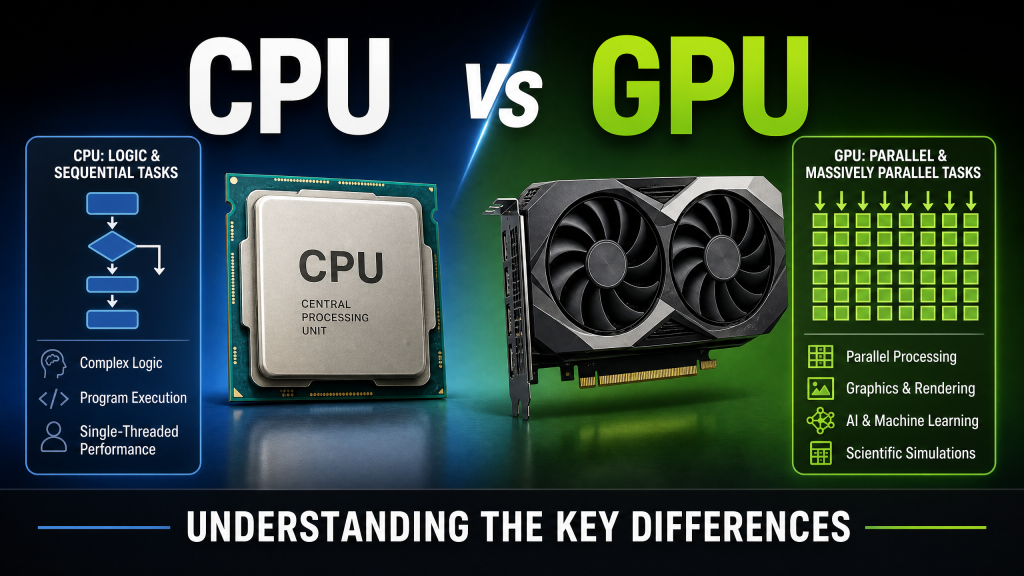
The primary difference between a CPU and a GPU lies in how they process information.
CPUs are optimized for serial processing, meaning they execute a smaller number of highly complex tasks extremely efficiently. They feature advanced control logic, large caches, and sophisticated branch prediction systems to maximize performance on sequential workloads.
GPUs, by contrast, are optimized for parallel processing. Rather than focusing on a few complex tasks, GPUs can execute thousands of simpler operations simultaneously. This makes them exceptionally effective for workloads involving large datasets and repetitive calculations.
| Feature | CPU | GPU |
|---|---|---|
| Primary Purpose | General Computing | Parallel Processing |
| Core Count | 4–24+ Cores | Hundreds to Thousands of Cores |
| Latency | Very Low | Higher |
| Clock Speed | Typically Higher | Typically Lower |
| Parallel Workloads | Moderate | Excellent |
| Gaming Graphics | Limited | Excellent |
| AI Workloads | Good | Outstanding |
| Power Efficiency for Parallel Tasks | Lower | Higher |
How CPUs Process Data
CPUs excel at tasks requiring rapid decision-making and complex instruction execution. For example, when running a spreadsheet application, the CPU continuously processes user inputs, updates formulas, manages memory, and communicates with storage devices.
A CPU’s architecture includes several advanced components:
- Arithmetic Logic Units (ALUs)
- Control Units
- L1, L2, and L3 Cache
- Branch Predictors
- Execution Pipelines
- Integrated Memory Controllers
These features allow CPUs to execute a wide variety of workloads with exceptional responsiveness.
How GPUs Process Data
GPUs approach computing differently. Instead of prioritizing low-latency execution, they focus on maximizing throughput.
Imagine rendering a 4K game scene containing millions of pixels. Each pixel requires lighting calculations, texture processing, shadows, reflections, and color adjustments. Performing these calculations sequentially would be extremely slow.
A GPU divides the workload among thousands of cores, allowing calculations to occur simultaneously. This massively parallel approach enables modern games and professional applications to achieve performance levels impossible with CPUs alone.
Gaming Performance
For gaming, both the CPU and GPU are important, but the GPU typically has the greatest impact on visual quality and frame rates.
Modern games rely heavily on GPU power for:
- Texture rendering
- Ray tracing
- Anti-aliasing
- Shadow calculations
- Particle effects
- High-resolution output
Meanwhile, the CPU handles:
- Game logic
- Physics simulations
- Artificial intelligence
- NPC behavior
- Networking calculations
- Background system tasks
A powerful GPU paired with a weak CPU can result in CPU bottlenecks, while a strong CPU paired with an underpowered GPU may limit visual performance. Achieving balance is essential.
Content Creation and Video Editing
Content creators increasingly rely on GPU acceleration to speed up workflows.
Applications such as:
- Adobe Premiere Pro
- DaVinci Resolve
- Blender
- Cinema 4D
- Autodesk Maya
- After Effects
use GPUs to accelerate rendering, effects processing, and timeline playback.
However, CPUs remain important for:
- Project management
- Software execution
- File compression
- Video encoding
- General workflow responsiveness
Professional workstations often require both powerful CPUs and high-end GPUs to maximize productivity.
Artificial Intelligence and Machine Learning
Artificial intelligence has dramatically increased the importance of GPUs over the past decade.
Training modern AI models involves performing billions or even trillions of mathematical operations. GPUs excel at these calculations because they can process large matrices simultaneously.
Machine learning frameworks such as:
- TensorFlow
- PyTorch
- JAX
- CUDA-based applications
are optimized for GPU acceleration.
A high-end GPU can complete AI training workloads many times faster than even the most powerful consumer CPU.
This advantage has made GPUs essential for:
- Large Language Models (LLMs)
- Image generation
- Speech recognition
- Computer vision
- Data science
Scientific and Professional Computing
Researchers and engineers frequently use GPUs for computationally intensive tasks.
Examples include:
- Weather simulations
- Molecular modeling
- Physics simulations
- Financial analysis
- Medical imaging
- Engineering calculations
Many modern supercomputers combine CPUs and GPUs to achieve extraordinary levels of performance.
Advantages of CPUs
- Excellent single-thread performance
- Handles complex instructions efficiently
- Essential for operating system management
- Superior responsiveness for everyday tasks
- Generally lower power consumption for general workloads
- Works with virtually all software applications
- Strong multitasking capabilities
Advantages of GPUs
- Massive parallel processing capability
- Exceptional gaming performance
- Ideal for AI and machine learning
- Accelerates video rendering
- Outstanding 3D rendering performance
- Excellent performance in scientific computing
- Handles large-scale data processing efficiently
Integrated Graphics vs Dedicated Graphics
Many CPUs include integrated graphics processors capable of handling everyday tasks and light gaming.
Integrated graphics are suitable for:
- Office work
- Web browsing
- Video playback
- Light photo editing
- Casual gaming
Dedicated GPUs remain essential for:
- Modern gaming
- 4K content creation
- Professional rendering
- AI development
- Virtual reality applications
Which One Should You Upgrade First?
The answer depends entirely on your workload.
Gamers generally benefit most from upgrading the GPU because graphics rendering is typically the primary performance bottleneck.
Users focused on:
- Office productivity
- Programming
- Business applications
- General multitasking
may see greater improvements from a CPU upgrade.
Content creators and professionals often benefit from upgrading both components to maintain balanced performance.
Common CPU and GPU Pairings
For optimal performance, hardware should be balanced.
- Ryzen 5 9600X + RTX 4070 Super
- Core i5-14600K + RTX 4070 Ti Super
- Ryzen 7 9800X3D + RTX 5080
- Core Ultra 9 + RTX 5090
- Threadripper Pro + RTX 6000 Ada
These combinations help minimize bottlenecks while maximizing performance across gaming and productivity workloads.
The Future of CPUs and GPUs
The distinction between CPUs and GPUs continues to evolve. Modern processors increasingly include dedicated AI accelerators, integrated graphics, and specialized processing units.
At the same time, GPUs are becoming more versatile, handling workloads that were once exclusively CPU territory.
Emerging technologies such as chiplet architectures, unified memory systems, and AI-enhanced computing will continue to blur the lines between traditional CPU and GPU responsibilities.
Conclusion
CPUs and GPUs serve different but complementary roles in modern computers. The CPU acts as the central coordinator, handling complex instructions, operating system management, and general-purpose computing tasks. The GPU specializes in parallel processing, making it exceptionally powerful for gaming, graphics rendering, artificial intelligence, and scientific workloads.
Whether you are building a gaming PC, editing videos, training AI models, or creating a professional workstation, understanding the strengths and limitations of each processor helps ensure you choose the right hardware configuration. In most scenarios, the best experience comes from a balanced combination of a capable CPU and a powerful GPU working together to maximize system performance.
gether.
